

Step-by-Step Sign-Up Process
The TrustStake register flow is designed for speed while still capturing the details required for regulatory compliance and safer-gambling controls. Players complete the entire process in a single session without needing supporting documents at this stage — those come later during KYC verification. The full sequence proceeds through six clearly separated steps.
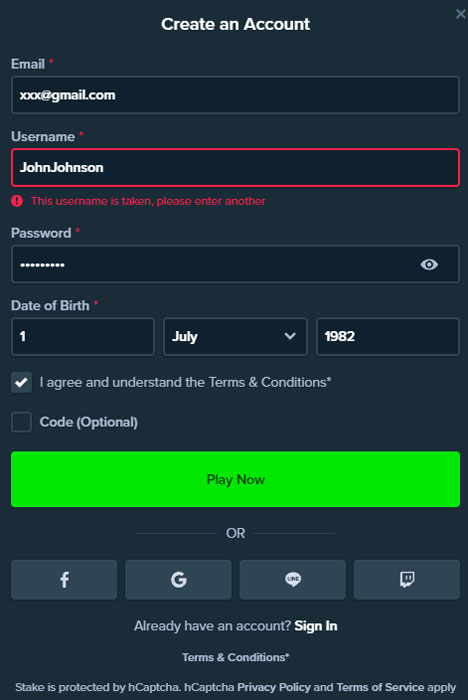
- Click the Register button in the top-right corner of any TrustStake page to open the signup pop-up.
- Enter a valid email address, create a strong password (minimum eight characters combining letters and numbers), and provide a mobile phone number for SMS confirmation.
- Select country of residence and preferred currency (EUR is the default). Availability depends on jurisdiction.
- Provide any remaining profile details prompted by the form, including full legal name and date of birth for age verification.
- Confirm acceptance of the Terms & Conditions, Privacy Notice and responsible gambling policies through the checkbox array.
- Submit the form and verify the registered mobile number by entering the one-time SMS code sent to the phone.
The operator's terms prohibit multiple accounts per player. Any breach can result in account closure and forfeiture of funds, so players should register only once using accurate personal details that match the identity documents they will later submit for KYC verification. The name entered at registration must match the government-issued ID exactly — including middle names and spelling — to avoid delays at the verification stage. Currency selection is permanent — EUR is the default and works with all supported payment methods on the platform. Players who plan to claim a welcome package should check the TrustStake bonus page before completing the first deposit, since the choice between Marlin Masters and Sakura Fortune happens at the cashier immediately after signup.
Login Methods — Password or SMS Code
Returning players access their TrustStake accounts through two authentication paths, each with distinct convenience and security trade-offs. Both options connect to the same underlying account, and players can switch between them freely.
Login Method Comparison
| Method | How It Works | Best For |
|---|---|---|
| Password Login | Standard email plus password combination | Desktop sessions, players using password managers |
| SMS One-Time Code | Request a code to registered mobile, enter it in place of password | Mobile play, players preferring passwordless access |
If a password is forgotten, the recovery flow takes three steps: click Forgot password on the login screen, enter the registered email address to receive a reset link, then create a new password following the platform's strength requirements. Reset links expire after 60 minutes for security reasons. Keeping the Remember me checkbox unticked on shared or public devices is sensible, and switching to the SMS one-time code method on any device that other people occasionally access adds protection. The SMS route provides an extra layer of security because possession of the registered phone number is required for every login attempt. Full mobile access details live on the TrustStake app page.
KYC Verification — Documents and Timeline
Identity verification at TrustStake protects against money laundering, underage gambling and account fraud, and is a standard requirement under the Curaçao licensing framework. Verification is typically triggered before the first significant withdrawal, but proactive players can submit documents during registration to eliminate delays later. The process requires two mandatory document categories, plus a third if withdrawing to cards or e-wallets.
Accepted KYC Documents
| Document Type | Accepted Examples | Notes |
|---|---|---|
| Photo ID | Passport, Driving Licence, National ID Card | Must be current and unexpired, showing clear photo and full name |
| Proof of Address | Utility bill, Bank statement, Council tax notice | Dated within the last three months; mobile phone bills are not accepted |
| Payment Method Proof | Card front photo (middle digits masked), e-wallet screenshot | Only requested for card or e-wallet withdrawal methods |
Documents are uploaded through the account verification section of the cashier. Processing typically takes 24–48 hours during business days, with the compliance team responding by email if any resubmission is required. When a document is rejected, the notification specifies exactly what needs to be corrected — so the process does not need to restart from scratch. Names and addresses across all documents must exactly match the details entered during registration; any mismatch triggers additional checks. Uploading high-resolution scans or clear photos taken in good natural lighting, avoiding cropped edges, and ensuring all four corners of each document remain visible in the frame speeds approval. Full context on licensing scope and payment infrastructure lives on the main TrustStake casino page.
| CRITERION | TRUSTSTAKE | CASINACHO ★ |
|---|---|---|
| Game catalogue | 2,000+ titles | 7,500+ titles |
| Live casino | Live dealer tables | 400+ Evolution tables |
| Welcome offer | €5,000 + 300 FS | £3,000 + 200 spins |
| Bonus wagering | 35x dep+bonus | Lighter requirements |
| Crypto payouts | Cards & crypto | Fast crypto payouts |
| Sports betting | Full sportsbook | Casino-focused |
Common Sign-Up and Login Problems
Most TrustStake login and registration issues resolve through standard fixes. Persistent problems require live chat support for account-level intervention.
Common Issues and Fixes
- SMS code not received — check phone signal, wait 60 seconds, then request a new code; verify the mobile number was entered without country-code duplication
- Email verification link missing — check spam and promotions folders, add the sender domain to the safe list, then request a resend from the profile page
- Password reset link not working — reset links expire after 60 minutes for security; request a fresh reset if the previous email arrived late
- Account locked after multiple attempts — contact live chat immediately; automated lockouts typically release after 24 hours
- Country not supported at signup — availability depends on jurisdiction, and attempting to bypass geo-restrictions violates the terms