

Is There a TrustStake iOS or Android App?
The answer for players searching the App Store or Google Play: TrustStake does not offer a native mobile application on either platform. This is a common situation for Curaçao-licensed operators, since Apple and Google enforce strict gambling app policies that require operator licensing in specific jurisdictions before allowing distribution through their stores.
The only official access route to the TrustStake platform runs through the browser at the operator's registered domain — no download of any kind is officially supported, and files labelled "TrustStake APK" on third-party sites are not official. Adding the site to the home screen (below) delivers the closest thing to an installed app without any download. Full context on the operator, its licence and its product suite lives on the main TrustStake casino page.
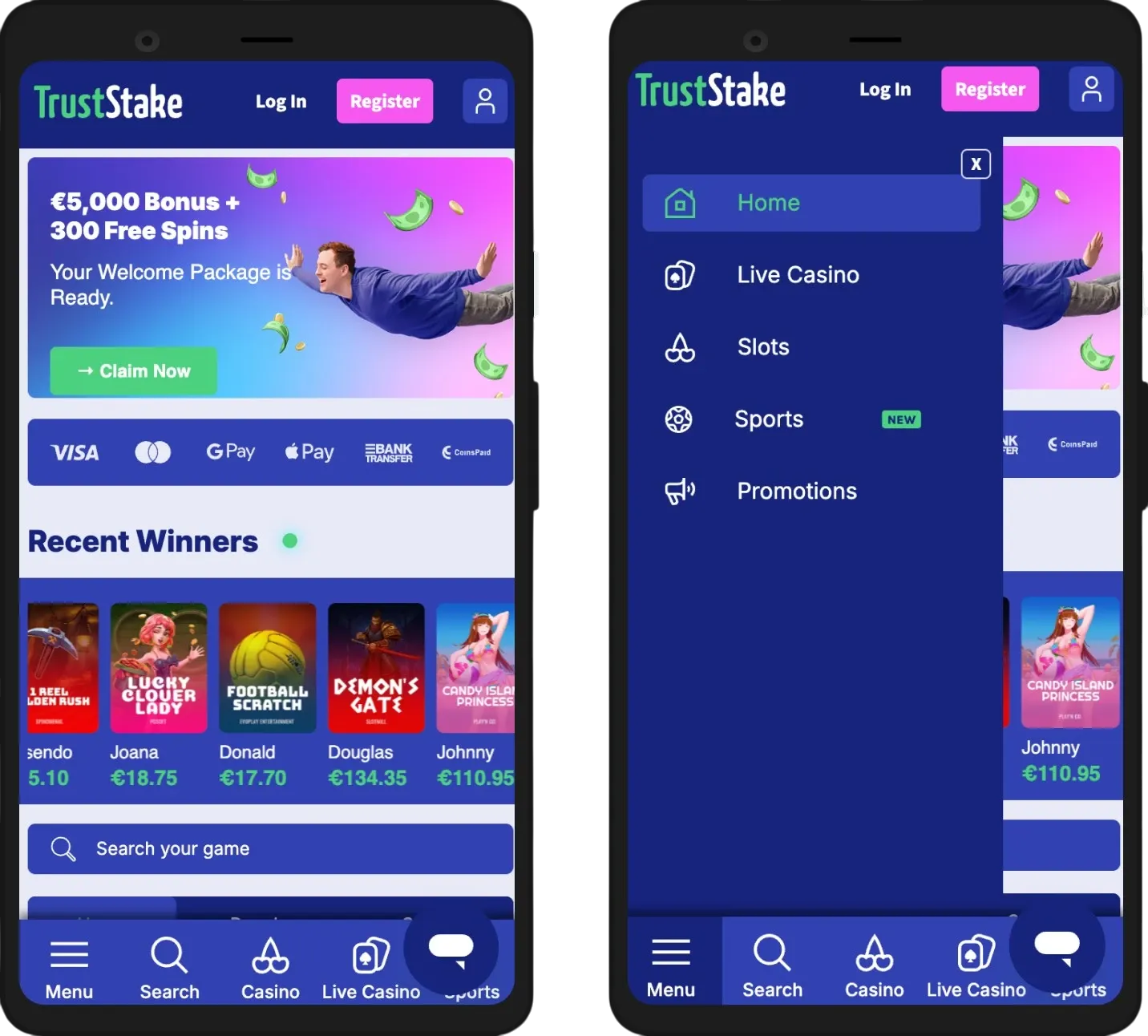
What to Expect from Mobile Browser Play
Mobile access at TrustStake delivers the full desktop feature set through any modern browser — the responsive design adjusts layout and touch targets automatically without losing functionality. Players can browse the game lobby, deposit funds, wager, chat with support and manage their account entirely from a smartphone or tablet, with feature parity across all screen sizes.
Mobile Compatibility Overview
| Platform | Minimum OS | Recommended Browsers |
|---|---|---|
| iPhone / iPad | iOS 14 or later | Safari (best), Chrome, Firefox |
| Android phones / tablets | Android 8.0 or later | Chrome (best), Samsung Internet, Firefox |
| Other tablets | Modern browser | Any Chromium or WebKit browser |
Slot titles from major providers like Play'n GO, Pragmatic Play and Hacksaw Gaming perform smoothly on mid-range 2020-and-later devices. Live casino streams — Crazy Time, Lightning Roulette, Live Blackjack — hold up well in both portrait and landscape orientations, though multitabling multiple live tables on smaller phone screens can feel cramped. The cashier is fully touch-optimised, and the live chat widget is anchored to every page with a persistent floating button rather than buried inside a menu. Loading times on 4G and 5G connections generally match desktop performance in most conditions.
Add TrustStake to the Home Screen
Adding the TrustStake site to a mobile home screen creates a one-tap shortcut that launches the platform in full-screen mode with the browser address bar hidden — visually almost indistinguishable from a native app experience.
iOS Home Screen Setup (Safari)
- Open Safari and navigate to the TrustStake site
- Tap the Share button at the bottom of the screen
- Scroll down and select Add to Home Screen
- Confirm the shortcut name and tap Add in the top-right corner
Android Home Screen Setup (Chrome)
- Open Chrome and navigate to the TrustStake site
- Tap the three-dot menu in the top-right corner
- Select Add to Home Screen or Install app
- Confirm the shortcut name and tap Add
The resulting icon behaves like a standard app icon — long-press moves or removes it, and launching opens the site in full-screen webview. This shortcut is a bookmark rather than a real application, so it does not appear in the App Store or Google Play, does not update through those channels, and requires an internet connection to function.
| CRITERION | TRUSTSTAKE | CASINACHO ★ |
|---|---|---|
| Game catalogue | 2,000+ titles | 7,500+ titles |
| Live casino | Live dealer tables | 400+ Evolution tables |
| Welcome offer | €5,000 + 300 FS | £3,000 + 200 spins |
| Bonus wagering | 35x dep+bonus | Lighter requirements |
| Crypto payouts | Cards & crypto | Fast crypto payouts |
| Sports betting | Full sportsbook | Casino-focused |
Mobile-Specific Features Worth Knowing
TrustStake pairs its responsive design with several features that specifically favour mobile-first players. These are worth understanding before starting a session on a phone or tablet.
Mobile Feature Set
- Passwordless SMS Login — request a one-time code to the registered mobile and skip password entry entirely; ideal for touch keyboards
- Touch-Optimised Cashier — deposit method selection uses large tap targets, with Apple Pay and Google Pay integrating natively where supported
- Persistent Live Chat Button — anchored to every page rather than hidden in menus, so support is one tap away during any session
- Portrait and Landscape Support — games render correctly in both orientations, with automatic switching based on device rotation
- Unified Wallet Across Casino and Sportsbook — move between slot spins and live football betting without switching accounts or transferring funds
- Session Timer Notifications — reality-check alerts appear as system-style overlays that respect device notification settings
Registration on mobile takes the same two minutes as desktop, and welcome package selection happens in exactly the same cashier flow — full activation steps for both Marlin Masters and Sakura Fortune are documented on the TrustStake bonus page. New players who prefer to open an account first can complete the entire signup through the mobile browser at the TrustStake registration page, then return here to add the site to the home screen for future one-tap access.